
Factory reset
A factory reset deletes all user content and settings and returns the device to its state right after installation. Use it when handing the device over to another organization, or when the settings are a mess and you want to start over.
This is not the first step for ordinary problems. If you have connection or display problems, first try rebooting and Troubleshooting.
What is deleted and what is kept
| Item | After a factory reset |
|---|---|
| All uploaded images (including thumbnails and converted files) | Deleted |
| Image sets | Deleted |
| Schedules, light schedules | Deleted |
| Multi-panel media library (uploaded documents) | Deleted |
| Multi-panel lists, layouts, time-slot schedules and publish settings | Deleted (each panel goes back to an empty default list) |
| Multi-panel panel wiring | Kept (registrations and swaps are not lost) |
| All settings (sleep, button gestures, G-Sensor, startup screen, refresh mode, scan direction, edge mask, manual light state) | Back to defaults |
| Screen language | Back to the language set at installation |
| System logs | Deleted |
| Black box incident packages | Kept (this reset is itself recorded as a package), see Black box incident packages |
| Model | Keeps the setting from installation |
| Wi-Fi hotspot name and password | Back to this device's factory values, see The hotspot password returns to the factory password |
| Wi-Fi networks added by users | Deleted |
| Networks preset at the factory | Kept |
| Network mode | Back to the factory default |
| Cluster | Leaves the cluster; cluster settings are cleared |
| Time zone, time, NTP switch | Kept |
| Software version | Kept (not downgraded) |
| Tcon firmware | Kept |
Cannot be undone
Data can't be recovered after a factory reset. To keep your content, first export a settings file with Export / import settings: photos, image sets, schedules, settings and hotspot settings are all in it, and you can import it back afterwards.
The settings file can't carry Wi-Fi passwords. For any Wi-Fi network you'll need to add again after the reset, make sure you have its password at hand first.
The hotspot password returns to the factory password
A factory reset returns the hotspot name, password and other hotspot settings to this device's factory values. If you changed the hotspot name or password under "Network", connect to the factory hotspot after the reset.
| Device | Factory hotspot password |
|---|---|
| Devices freshly installed from 1.11.0 on | Different for every device, printed on the hotspot label on the device body |
| Devices updated from older software | Keep their original factory password; software updates don't change it |
- The first QR code on the startup screen joins the factory hotspot directly, without typing the password (after the reset the startup screen is back to its default, "On").
- If the hotspot label is lost and you don't know the factory password, contact technical support.
Method 1: From the management interface
Navigation: Settings → System → Software Update → the red "Factory Reset" section at the bottom of the page
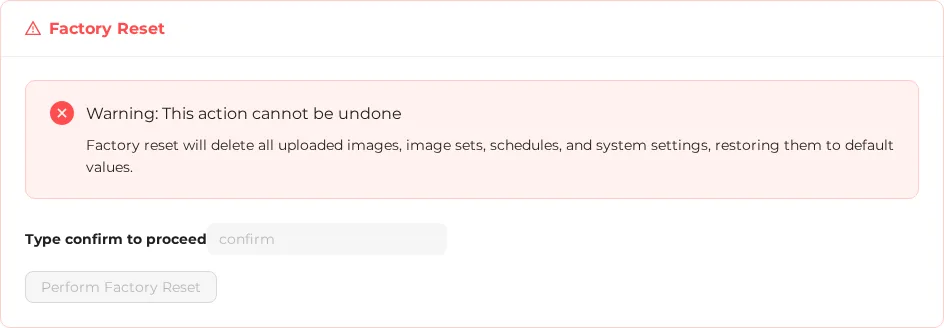
- Read the warning: "Factory reset will delete all uploaded images, image sets, schedules, and system settings, restoring them to default values."
- In the "Type confirm to proceed" box, type
confirmin lowercase (the border turns red if you type it wrong). - Press Perform Factory Reset (you can press it only after typing correctly; there is no second confirmation after you press it).
- "Resetting to factory defaults, please wait..." and "Will reconnect automatically after reboot" appear.
- When done, "Factory Reset Complete" appears; this takes about 1–2 minutes.
Where to find it
Although the description of "Power Control" on the Settings page says "factory reset", the actual entry is at the bottom of the "Software Update" page.
Method 2: With a physical button
On the device, hold down any physical button for 40 seconds:
| Hold time | Status LED |
|---|---|
| 3 seconds | Starts blinking fast (red on full-color LEDs); the countdown begins |
| 40 seconds | Steady on (red on full-color LEDs); the factory reset starts |
- Releasing the button before 40 seconds, or pressing another button as well, cancels it.
- At 1.5 seconds the QR code startup screen refreshes first (the early part of the same gesture). This is normal; keep holding. See The long press and the factory reset are the same gesture.
- Useful when you've forgotten how to connect or the management interface won't open.
- Models without an indicator light can also use it, just without LED feedback. Time it and hold for the full 40 seconds.
What happens during a factory reset
- The current data is first backed up temporarily.
- The management app is stopped, and images, the database and logs are deleted.
- The configuration files are restored to their contents at installation.
- The network is reset: the hotspot returns to its factory values and Wi-Fi networks added by users are deleted.
- The device leaves the cluster and its cluster settings are cleared (if it is in a cluster, the other members are notified first).
- The management app is restarted, and the system waits up to 90 seconds to confirm it runs normally.
- On success, the temporary backup is deleted; on failure, the images, database and settings are restored.
If step 4 or 5 fails, the factory reset as a whole isn't stopped; everything else is completed as usual.
The network and cluster are not restored
If step 7 fails, the images, database and settings are restored; a network that has already been reset and a cluster that has already been left are not put back.
When it's done:
- The panel shows the QR code startup screen (the startup screen setting is back to its default, "On").
- The hotspot name and password are back to their factory values. If you had changed them, your phone disconnects: connect to the factory hotspot (see The hotspot password returns to the factory password) and the web page reconnects automatically.
- If the device needs to be on the on-site Wi-Fi, add the network again under "Network".
- Check the time again, then upload images and create image sets and schedules again.
If it fails
| Message | Meaning | Fix |
|---|---|---|
| Factory reset failed, please try again later (right when you press the button) | The reset process couldn't start; nothing on the device was changed | Try again later, or reboot the device and try again |
Failure with the subtitle app failed to start after reset | The app couldn't start after the reset; the images, database and settings were restored automatically | Contact technical support |
| Connection Timed Out | The result couldn't be confirmed within 5 minutes; the most common cause is that the hotspot returned to its factory values and your phone disconnected | Connect to the factory hotspot and refresh the page to check |
Versions before 1.11.0 falsely report a failure
In older versions, right after you press "Perform Factory Reset", the web page may immediately show "Factory reset failed, please try again later", even though the factory reset actually goes ahead. This is fixed in 1.11.0. If you see this message on an older version, wait 1–2 minutes and refresh the page to check; don't press the button again right away.
Related: Export / import settings, Data retention and what gets deleted, Physical buttons and gestures, Software update